
We just got a couple of new webpart in SharePoint Online, "Markdown" are easily my favourite. Add the markdown webpart to your page, "Code Snippet" is also #awesome When editing the webpart you can turn on the preview to see if your markdown is looking right If you are new to "markdown" edit the webpart …
Category: O365

Office365 User Onboarding – MS Forms, Flow, SharePoint Online and Azure Automation
WARNING! This is a long post… User onboarding is something IT department's have been doing for years, with the move to Office 365 the process have change a little bit. This post present a guide on how to automate this process for Office 365. Thanks to my #awesome colleague Tom-Inge Larsen for his #magical skill …
Continue reading Office365 User Onboarding – MS Forms, Flow, SharePoint Online and Azure Automation
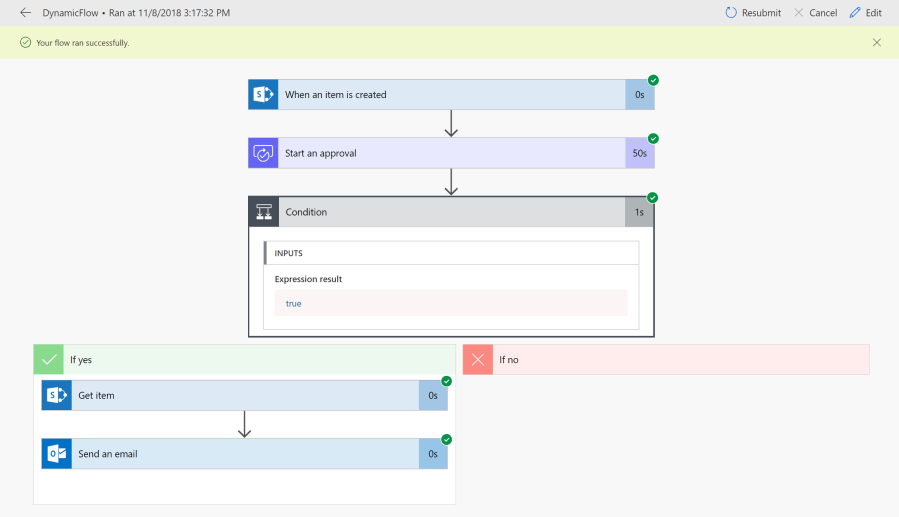
MS Flow 101 – send updated data from a SharePoint list Item
Back in good old days with SharePoint Designer, when you use the send an email action, it always send out the correct dynamic information from the SharePoint list Item, In Flow this work differently , below is my experience with this: Scenario steps: User request an approval via a SharePoint/PowerApps form Approval request is sent …
Continue reading MS Flow 101 – send updated data from a SharePoint list Item
Connect-PnPOnline : For security reasons DTD is prohibited in this XML document
Just changed my internet provider, and got this error again. Connect-PnPOnline : For security reasons DTD is prohibited in this XML document. To enable DTD processing set the DtdProcessing property on XmlReaderSettings to Parse and pass the settings into XmlReader.Create method. Just want to document the solution: 127.0.0.1 msoid.tenantdomain.onmicrosoft.com 127.0.0.1 msoid.onmicrosoft.com Cheers
SharePoint Online Hub Site
SharePoint Online Hub site is almost GA, 😉 This is the stuff that the Hub site brings to the table for the Modern Intranet. Using SharePoint Online PowerShell run the following command Connect-SPOService -Url https://tenant-admin.sharepoint.com Register-SPOHubSite "siteURL" After this magic happens, we get a new top Navigation for the Hub site Site setting now have …
 My SharePoint Log